A gauge is your blanket's key: a list of yarn colors, each with a range of weather. A day's weather falls in one range, and that range's color is the color of the day's row or square.
Gauges
Every project has a Temperature Gauge. Add more to use other weather in the same blanket, like a rain stripe between temperature rows. The buttons above the colors switch between gauges; one with a + isn't in your project yet, and pressing it asks to add it.
- Temperature Gauge: high, average and low temperatures.
- Rain Gauge and Snow Gauge: how much fell.
- Daytime Gauge: hours from sunrise to sunset.
- Moon Phase Gauge: eight colors, one for each phase of the moon. Its ranges are fixed; you only choose the colors.
A gauge shows up only when the weather has what it needs. To remove one (except temperature), open it, press the ⋮ beside its name and choose Delete. Which gauge a row or square uses is set in the preview.
Colors and Ranges
Each color in the gauge has its range beside it, written From → To: 30 → 20 means from 30° down to 20°. Under the colors:
- Change a number: press it, type the new number, then press Save (or Enter). ✕, Escape, or pressing anywhere else puts it back.
- Change a color: press its swatch, and choose a new color or yarn.
- Move a color: drag it by its handle (the number). With a keyboard, focus the handle, press Space, move it with the arrow keys, and press Space again.
- More (⋮): the yarn's shop page, copy its name or hex code, Add color before or after, or remove it.
- Number of colors: the menu above the gauge, up to 99. With your own colors, new ones are added at the end and extra ones are taken off the end. With a gradient, the gradient is remade in that many colors.
With Days in ranges on (in View), each color shows how many days fall in its range and what share of the blanket that is. Press a count to see those days.
View also lays the colors out as a Grid or a List, and Fill backgrounds paints each one in its color. Space between sets them apart or together in one block (a grid and a list each remember their own).
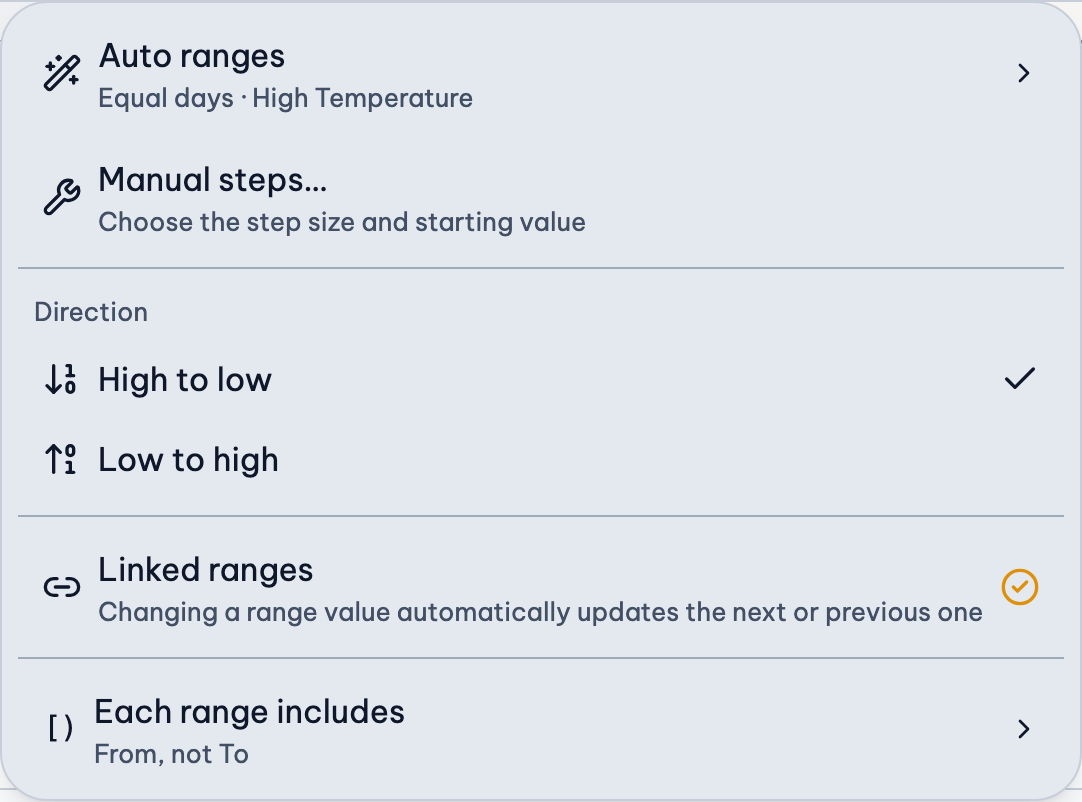
The Ranges Menu
The Ranges button above the colors says how your ranges were made:
- Auto: made from your weather, and remade when the weather or the number of colors changes.
- Manual: made from a step size you chose.
- Edited: you've changed a range's numbers yourself. Your edits stay until you choose Auto ranges or Manual steps again (Undo brings them back).
Auto ranges
- Equal size: every range covers the same amount, from your coldest to your warmest day. The menu shows the size.
- Equal days (temperature only, by High, Average or Low): about the same number of days in each range, so every color gets used about as much. Ranges are narrower where most of your days are.
- Round numbers: appears when an equal size has decimals, to use whole numbers instead.
Manual steps
Choose Manual steps…, then fill in Every (the size of each range, like 5°) and From (where the first range starts). The colors update as you type; press Save to keep them.
Direction
- High to low: the first color has the highest range: 30 → 20, 20 → 10…
- Low to high: the first color has the lowest range: 10 → 20, 20 → 30…
Linked ranges
On by default. Changing where one range ends also changes where the next one starts, so no days are left out. Turn it off to edit each range on its own.
Rain and snow ranges never go below 0. Choosing ranges for your yarn.
Each Range Includes
Ranges share their ends: 30 → 20 is followed by 20 → 10. So when a day is exactly 20°, which range is it in? Each range includes, in the Ranges menu, decides. A sentence above your ranges says which you chose.
- From, not To (the default): 30 → 20 holds 30° and everything down to 20°, but not 20° itself. A 20° day goes in 20 → 10.
- To, not From: 30 → 20 holds 20° and everything up to 30°, but not 30°. A 30° day goes in the range before.
- Both From and To: 30 → 20 holds both. To keep a day from fitting two ranges, they need a gap: 30 → 20.01, 20 → 10.01…
- Neither: only what's in between. To leave no day out, they need an overlap: 30.01 → 20, 20.01 → 10…
| Each range includes | 13° | 12.5° | 12° |
|---|---|---|---|
| From, not To (default) | Yes | Yes | No |
| To, not From | No | Yes | Yes |
| Both From and To | Yes | Yes | Yes |
| Neither | No | Yes | No |
If a day fits two ranges, it takes the color of the first one (the higher one in the list), though it's counted in both. With Both or Neither, rounded or manual steps can leave such overlaps or gaps; the gauge warns you when they do.
Related Guides
- Choose Ranges for Your Yarn: How ranges work, why the numbers repeat, and how to make them fit the colors you have.
- Rain, Snow and Sunshine Blankets: Blankets for rain, snow or daylight instead of temperature, and how their ranges work.
- Match Your Own Yarn, or a Photo: Use yarn you already have or can buy, or take the colors from a photo you love.